Parent info
Parts you need
Affiliate links — we may earn a small commission
Try this circuit in your browser!
Run the code, press the buttons and watch what happens — before you buy any parts. No account needed.
Open in Simulator →Fog bursts before they ring. A random scream when they do.
Imagine this: someone walks up your path. Before they reach the door, fog billows across their feet. They freeze. They press the skull-shaped doorbell button. A witch cackles. Or thunder cracks. Or a wolf howls — they don’t know which one is coming.
Nobody makes it to your door with their nerves intact.
That’s what we’re building. In 2 hours. For about $55.
What you’ll need
| Part | What it does | Price |
|---|---|---|
| ESP32-S3-DevKitC-1 or ESP32-C6-DevKitC-1 | The brain — handles PIR, button, fog timing, audio and the phone control panel | ~$12 |
| PIR Motion Sensor (HC-SR501) | Detects someone approaching — triggers the fog | ~$4 |
| DFPlayer Mini MP3 Module | Plays random creepy sound when doorbell is pressed | ~$5 |
| Speaker (4Ω 3W) | Needs to be heard through a door from outside | ~$4 |
| 5V Relay Module (3.3V trigger) | Switches the fog machine on and off | ~$3 |
| Fog Machine (120V) | The atmospheric setup — fills the path with fog | ~$25 |
| Momentary push button | The doorbell button (you’ll 3D print a skull housing) | ~$2 |
Total: ~$55 | Time: ~2 hours | Difficulty: ●●●○○
Sound files: Download 10 creepy sound effects from
freesound.org. Good options: creaking door, witch cackle, thunder crack, wolf howl, demonic laugh. Name them0001.mp3through0010.mp3on a FAT32-formatted SD card.
SAFETY NOTE FOR PARENTS: The fog machine runs on 120V/230V mains electricity, which can kill. Only an adult makes any mains connection, whatever the builder’s age. Best: use a ready-made relay power outlet box or the fog machine’s remote input, so nobody opens a mains cord. If an adult wires the relay into the mains, it goes inside a closed plastic box with strain relief — never bare terminals, never electrical tape. Keep everything dry, and keep the hot fog nozzle away from children, pets and faces.
How it works (60 seconds)
Think of it as two separate traps working together.
Trap 1 (atmospheric): The PIR sensor watches the approach path about 3–4 meters from your door. When someone walks up, the ESP32 switches the relay on, which completes the fog machine’s power circuit. Three seconds later, the relay switches off and the fog stops. There’s a 30-second lockout — the fog machine needs time to reheat its fluid before it can fire again. For the first 60 seconds after power-on the trap ignores the PIR, because the sensor is still “warming up” and gives false alarms.
Trap 2 (audio): The skull doorbell button is wired between a board pin and GND. When pressed, the ESP32 picks a random sound — never the same one twice in a row — and tells the DFPlayer Mini to play it. Volume is at 28 out of 30 — this needs to be heard through a closed door.
Your phone is the control panel: the ESP32 also runs a small web page. You can see when someone is on the path, count the fog bursts and doorbell rings, fire the fog or a scream by hand, change the volume, and switch the motion trap off — all from inside the house.
The killer detail: the fog before the ring. By the time they press the button, they’re already on edge.
Step 0: Print the skull doorbell
Time: ~2 hours print time (can print overnight)
Search Thingiverse for “Halloween doorbell skull.” Look for a design where a momentary push button inserts through the eye socket. Print in gray PLA, then dry-brush with white paint for aged bone effect.
The skull mounts over your existing doorbell hole using the original screws — no drilling. The push button hot-glues in place inside the socket.
Alternative: A large rubber spider works too — the button goes in the abdomen. Search “doorbell button cover spider.”
Step 1: Wire it up
Time: ~20 minutes
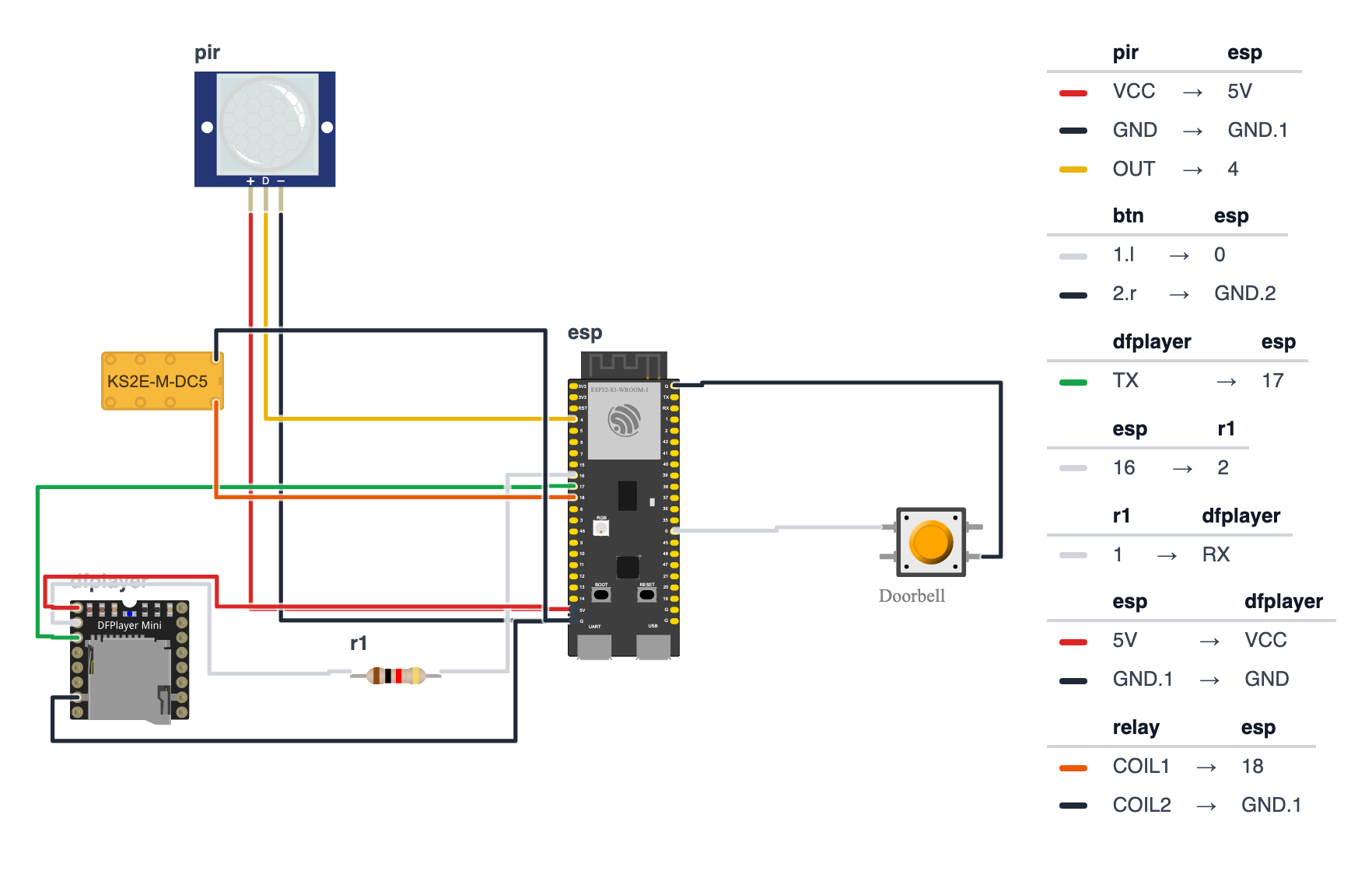
The code works on two boards. Use the pin numbers from the column for your board:
| Wire | ESP32-S3-DevKitC-1 | ESP32-C6-DevKitC-1 |
|---|---|---|
| PIR OUT (signal) | GPIO 4 | GPIO 0 |
| Doorbell button | GPIO 0 | GPIO 9 |
| Relay IN | GPIO 18 | GPIO 11 |
| DFPlayer TX → board | GPIO 17 | GPIO 20 |
| DFPlayer RX → 1kΩ resistor → board | GPIO 16 | GPIO 21 |
The steps below use the ESP32-S3 numbers. On a C6, swap in the numbers from the right column.
PIR Sensor (3 wires):
- PIR OUT (middle pin) → board GPIO 4 — yellow wire
- PIR VCC → board 5V pin — red wire
- PIR GND → board GND — black wire
(The HC-SR501 needs at least 4.5V to work properly, so it goes on 5V, not 3.3V. Its signal wire only ever sends 3.3V, which is safe for the board.)
Doorbell Button (2 wires): 4. Button one terminal → board GPIO 0 — white wire 5. Button other terminal → board GND — black wire
(No resistor needed — the code uses INPUT_PULLUP which handles this internally. Fun fact: GPIO 0 is also the BOOT button on the board itself, and on the C6 GPIO 9 is its BOOT button. So you can test the doorbell sound by pressing BOOT before you even wire the skull button! Just don’t hold the doorbell button while you plug the board in — that puts it into upload mode.)
DFPlayer Mini (4 wires + speaker): 6. DFPlayer TX → board GPIO 17 — green wire 7. DFPlayer RX → 1kΩ resistor → board GPIO 16 — white wire 8. DFPlayer VCC → board 5V pin — red wire 9. DFPlayer GND → board GND — black wire 10. Speaker + → DFPlayer SPK1 11. Speaker − → DFPlayer SPK2
Relay Module (3 wires from ESP32): 12. Relay IN (signal) → board GPIO 18 — orange wire 13. Relay VCC → board 5V pin — red wire 14. Relay GND → board GND — black wire
Tip: pick a relay module that says “3.3V trigger” or has a High/Low trigger jumper. Some cheap 5V relay modules don’t switch reliably from a 3.3V signal.
Fog Machine — ADULTS ONLY (120V/230V mains): 15. The safest way: don’t open the fog machine’s cord at all. Use a ready-made relay power outlet box (a closed box with a socket that a low-voltage signal switches) or a fog machine with a remote-control input, and connect the relay’s COM and NO terminals to that low-voltage input. 16. If an adult does switch the mains wire with the relay module: the relay must sit inside a closed plastic box with strain relief on both cables, screw terminals only, no exposed metal. Never cut the cord and join it with electrical tape.
Check: The relay has three output terminals: COM (common), NO (normally open), NC (normally closed). We use COM and NO — the circuit is open (fog off) until the relay activates. Never touch mains wiring while the fog machine is plugged in. Keep the relay box, the fog machine and the ESP32 dry — October nights are wet.
Fog machine safety: the nozzle gets very hot. Place the machine where kids and pets can’t touch it, and never point the fog at people’s faces.
Step 2: Load the SD card
- Format the SD card as FAT32.
- Add up to 10 sound files to the root folder.
- Name them exactly:
0001.mp3,0002.mp3, …,0010.mp3. - Insert into DFPlayer Mini.
The code asks the DFPlayer how many files are on the card, so 6 or 8 sounds work too.
The most common DFPlayer issue: Files in a subfolder instead of root. Or named
1.mp3instead of0001.mp3. Check this before debugging anything else.
Step 3: Upload the code
Install library via Arduino IDE Library Manager: DFRobotDFPlayerMini by DFRobot. The Wi-Fi, web server and .local name libraries are already built into the ESP32 board package.
Before uploading:
- At the top of the code, keep
#define BOARD_S3for an ESP32-S3 board. For an ESP32-C6, put//in front of the S3 line and remove the//in front of#define BOARD_C6. - Optional: type your home Wi-Fi name and password into
WIFI_NAMEandWIFI_PASSWORD. If you leave them as they are, the doorbell makes its own Wi-Fi hotspot instead.
The big picture first. This program turns the ESP32 into a two-trap doorbell system:
- The ESP32 is the brain — it watches for visitors and controls everything.
- The PIR sensor is the first eye — it sees body heat on the approach path and triggers the fog.
- The relay is a switch — it turns the fog machine’s power on and off.
- The button is the second trigger — when pressed, it plays a random creepy sound.
- The web page is your control panel — it shows what’s happening and lets you scare people by hand.
A program is like a recipe. The computer reads it top to bottom and does exactly what’s written, nothing more. Copy this entire recipe into Arduino IDE and upload it:
// ========== CHOOSE YOUR BOARD ==========
// Uncomment the line for YOUR board:
#define BOARD_S3    // ESP32-S3-DevKitC-1
//#define BOARD_C6  // ESP32-C6-DevKitC-1
// ========================================

#ifdef BOARD_S3
  #define PIN_PIR         4
  #define PIN_BUTTON      0
  #define PIN_RELAY      18
  #define PIN_DFPLAYER_RX 17
  #define PIN_DFPLAYER_TX 16
  #define PIN_BOARD_RGB   38
#endif
#ifdef BOARD_C6
  #define PIN_PIR         0
  #define PIN_BUTTON      9
  #define PIN_RELAY      11
  #define PIN_DFPLAYER_RX 20
  #define PIN_DFPLAYER_TX 21
  #define PIN_BOARD_RGB    8
#endif

#include <HardwareSerial.h>
#include <DFRobotDFPlayerMini.h>
#include <WiFi.h>
#include <WebServer.h>
#include <ESPmDNS.h>

// ---------- Pins ----------
#define PIR_PIN       PIN_PIR
#define BUTTON_PIN    PIN_BUTTON
#define RELAY_PIN     PIN_RELAY
#define DFPLAYER_RX   PIN_DFPLAYER_RX
#define DFPLAYER_TX   PIN_DFPLAYER_TX

// ---------- Settings ----------
#define RELAY_ON            HIGH
#define RELAY_OFF           LOW
#define FOG_DURATION_MS     3000
#define FOG_LOCKOUT_MS      30000
#define SOUND_LOCKOUT_MS    4000
#define PIR_WARMUP_MS       60000
#define VOLUME              28
#define MAX_TRACKS          10

// ---------- Wi-Fi ----------
const char* WIFI_NAME = "YOUR_WIFI_NAME";
const char* WIFI_PASSWORD = "YOUR_PASSWORD";
const char* HOTSPOT_NAME = "BuildCool-Doorbell";
const char* HOTSPOT_PASSWORD = "buildcool";
const char* WEB_NAME = "doorbell";

// ---------- Parts ----------
HardwareSerial mySerial(1);
DFRobotDFPlayerMini myDFPlayer;
WebServer server(80);

// ---------- Memory ----------
unsigned long fogStartTime  = 0;
unsigned long lastFogTime   = 0;
unsigned long lastSoundTime = 0;
bool fogActive              = false;
bool fogEverFired           = false;
bool armed                  = true;
bool lastButtonPressed      = false;
int totalTracks             = MAX_TRACKS;
int lastTrack               = 0;
int volume                  = VOLUME;
int fogCount                = 0;
int ringCount               = 0;
String webAddress = "";

// ---------- Web page ----------
const char PAGE[] PROGMEM = R"rawliteral(
<!doctype html><html lang="en"><head><meta charset="utf-8">
<meta name="viewport" content="width=device-width,initial-scale=1">
<title>Haunted Doorbell · BuildCool</title>
<style>
:root{--o:#f97316;--o6:#ea580c;--o7:#c2410c;--o50:#fff7ed;--o200:#fed7aa;--g9:#111827;--g7:#374151;--g5:#6b7280;--g2:#e5e7eb;--g0:#f9fafb;--ok:#16a34a;--bad:#dc2626}
*{box-sizing:border-box}
body{margin:0;font-family:-apple-system,BlinkMacSystemFont,"Segoe UI",Roboto,"Helvetica Neue",Arial,sans-serif;color:var(--g9);background:var(--g0)}
header{position:sticky;top:0;z-index:9;background:rgba(255,255,255,.9);backdrop-filter:blur(8px);border-bottom:1px solid var(--g2)}
.wrap{max-width:640px;margin:0 auto;padding:12px 16px}
.bar{display:flex;align-items:center;justify-content:space-between}
.logo{font-size:20px;font-weight:800;letter-spacing:-.02em;color:var(--g9);text-decoration:none}
.logo span{color:var(--o)}
.badge{display:inline-flex;align-items:center;gap:8px;background:var(--o50);border:1px solid var(--o200);color:var(--o7);font-size:13px;font-weight:500;padding:4px 12px;border-radius:999px}
.dot{width:8px;height:8px;border-radius:50%;background:var(--o);animation:p 2s infinite}
.off .dot{background:var(--g5);animation:none}
@keyframes p{50%{opacity:.35}}
h1{font-size:30px;font-weight:800;letter-spacing:-.02em;line-height:1.1;margin:20px 0 6px}
h1 span{color:var(--o)}
.sub{color:var(--g5);margin:0 0 20px}
.grid{display:grid;grid-template-columns:repeat(auto-fit,minmax(140px,1fr));gap:12px}
.card{background:#fff;border:1px solid var(--g2);border-radius:16px;padding:16px}
.wide{grid-column:1/-1}
.label{font-size:13px;color:var(--g5);font-weight:500}
.value{font-size:32px;font-weight:800;letter-spacing:-.02em;margin-top:4px}
.row{display:flex;gap:8px;flex-wrap:wrap;margin-top:10px}
.btn{display:inline-flex;justify-content:center;align-items:center;padding:12px 20px;background:var(--o);color:#fff;font-weight:600;border:0;border-radius:12px;font-size:15px;text-decoration:none;cursor:pointer;box-shadow:0 10px 15px -3px var(--o200)}
.btn:active{transform:scale(.95)}
.btn.ghost{background:#fff;color:var(--g7);border:1px solid var(--g2);box-shadow:none}
.btn.big{width:100%;padding:18px;font-size:18px}
.btn:disabled{opacity:.45}
input[type=range]{width:100%;accent-color:var(--o);margin-top:12px}
.state{display:inline-block;font-size:13px;font-weight:600;padding:2px 10px;border-radius:999px;background:var(--g0);border:1px solid var(--g2)}
.state.ok{color:var(--ok);border-color:#bbf7d0;background:#f0fdf4}
.state.bad{color:var(--bad);border-color:#fecaca;background:#fef2f2}
footer{color:var(--g5);font-size:13px;text-align:center;padding:28px 16px}
footer a{color:var(--o);font-weight:600;text-decoration:none}
</style></head><body>
<header><div class="wrap bar"><a class="logo" href="https://buildcool.fun">Build<span>Cool</span></a>
<span class="badge" id="live"><span class="dot"></span><span id="livetxt">Live</span></span></div></header>
<main class="wrap">
<h1>Haunted <span>Doorbell</span></h1>
<p class="sub">Fog before they ring · a scream when they do</p>
<div class="grid">
<div class="card wide"><div class="label">Status</div>
<div class="row"><span class="state" id="arm">–</span><span class="state" id="fog">–</span><span class="state" id="pir">–</span></div></div>
<div class="card"><div class="label">Fog bursts</div><div class="value" id="fc">0</div></div>
<div class="card"><div class="label">Doorbell rings</div><div class="value" id="rc">0</div></div>
<div class="card wide"><div class="label">Scare now</div>
<div class="row"><button class="btn big" id="fb" onclick="act('fog',1)">Fog burst</button></div>
<div class="row"><button class="btn big ghost" onclick="act('sound',1)">Random scream</button></div></div>
<div class="card wide"><div class="label">Motion trap</div>
<div class="row"><button class="btn" id="on" onclick="act('armed',1)">Armed</button><button class="btn ghost" id="offb" onclick="act('armed',0)">Off</button></div></div>
<div class="card wide"><div class="label">Volume · <span id="vv">–</span> / 30</div>
<input type="range" min="0" max="30" id="vol" onchange="act('volume',this.value)"></div>
</div></main>
<footer>Made with <a href="https://buildcool.fun">buildcool.fun</a></footer>
<script>
const $=id=>document.getElementById(id);
function live(ok){$("live").classList.toggle("off",!ok);$("livetxt").textContent=ok?"Live":"Offline"}
async function act(k,v){try{await fetch("/api/set?"+k+"="+encodeURIComponent(v),{method:"POST"});tick()}catch(e){live(false)}}
function st(id,txt,cls){$(id).textContent=txt;$(id).className="state "+cls}
async function tick(){
 try{const d=await (await fetch("/api")).json();
  st("arm",d.warmup>0?"PIR warming up "+d.warmup+" s":(d.armed?"Motion trap armed":"Motion trap off"),d.armed&&d.warmup==0?"ok":"");
  st("fog",d.fog?"FOG ON":(d.ready>0?"Fog reheating "+d.ready+" s":"Fog ready"),d.fog?"bad":(d.ready>0?"":"ok"));
  st("pir",d.motion?"Someone is there!":"No motion",d.motion?"bad":"");
  $("fc").textContent=d.fogCount;$("rc").textContent=d.ringCount;
  $("fb").disabled=d.fog||d.ready>0;
  $("on").className="btn"+(d.armed?"":" ghost");$("offb").className="btn"+(d.armed?" ghost":"");
  $("vv").textContent=d.volume;if(document.activeElement!==$("vol"))$("vol").value=d.volume;
  live(true)}catch(e){live(false)}
}
tick();setInterval(tick,1000);
</script></body></html>
)rawliteral";

// ---------- Helpers ----------
void blinkError(int times) {
  for (int i = 0; i < times; i++) {
    rgbLedWrite(PIN_BOARD_RGB, 64, 0, 0);
    delay(150);
    rgbLedWrite(PIN_BOARD_RGB, 0, 0, 0);
    delay(150);
  }
  delay(700);
}

bool pirWarmingUp() {
  return millis() < PIR_WARMUP_MS;
}

unsigned long fogWaitSeconds() {
  if (!fogEverFired || fogActive) return 0;
  unsigned long passed = millis() - lastFogTime;
  if (passed >= FOG_LOCKOUT_MS) return 0;
  return (FOG_LOCKOUT_MS - passed) / 1000 + 1;
}

// ---------- Fog and sound ----------
void startFog(const char* reason) {
  if (fogActive || fogWaitSeconds() > 0) return;
  Serial.print("# ");
  Serial.print(reason);
  Serial.println(" FOG ON.");
  digitalWrite(RELAY_PIN, RELAY_ON);
  rgbLedWrite(PIN_BOARD_RGB, 40, 40, 40);
  fogActive = true;
  fogEverFired = true;
  fogStartTime = millis();
  fogCount++;
}

void stopFog() {
  digitalWrite(RELAY_PIN, RELAY_OFF);
  rgbLedWrite(PIN_BOARD_RGB, 0, 0, 0);
  fogActive = false;
  lastFogTime = millis();
  Serial.println("# Fog off.");
}

void playScream() {
  int track = random(1, totalTracks + 1);
  if (totalTracks > 1) {
    while (track == lastTrack) track = random(1, totalTracks + 1);
  }
  lastTrack = track;
  Serial.print("# Playing track: ");
  Serial.println(track);
  myDFPlayer.play(track);
  lastSoundTime = millis();
  ringCount++;
}

// ---------- Wi-Fi and web server ----------
void startWiFi() {
  if (String(WIFI_NAME) != "YOUR_WIFI_NAME") {
    WiFi.mode(WIFI_STA);
    WiFi.begin(WIFI_NAME, WIFI_PASSWORD);
    Serial.print("# Joining Wi-Fi");
    unsigned long start = millis();
    while (WiFi.status() != WL_CONNECTED && millis() - start < 15000) {
      delay(250);
      Serial.print(".");
    }
    Serial.println();
    if (WiFi.status() == WL_CONNECTED) {
      webAddress = WiFi.localIP().toString();
      if (MDNS.begin(WEB_NAME)) {
        Serial.print("# Also try: http://");
        Serial.print(WEB_NAME);
        Serial.println(".local");
      }
      Serial.print("# Open in your browser: http://");
      Serial.println(webAddress);
      return;
    }
    Serial.println("# Could not join Wi-Fi, starting own hotspot instead");
  }
  WiFi.mode(WIFI_AP);
  WiFi.softAP(HOTSPOT_NAME, HOTSPOT_PASSWORD);
  webAddress = WiFi.softAPIP().toString();
  Serial.print("# Connect your phone to Wi-Fi \"");
  Serial.print(HOTSPOT_NAME);
  Serial.print("\" (password: ");
  Serial.print(HOTSPOT_PASSWORD);
  Serial.print("), then open http://");
  Serial.println(webAddress);
}

void handlePage() {
  server.send(200, "text/html", PAGE);
}

void handleApi() {
  unsigned long warmup = pirWarmingUp() ? (PIR_WARMUP_MS - millis()) / 1000 + 1 : 0;
  String json = "{";
  json += "\"armed\":" + String(armed ? "true" : "false");
  json += ",\"fog\":" + String(fogActive ? "true" : "false");
  json += ",\"ready\":" + String(fogWaitSeconds());
  json += ",\"warmup\":" + String(warmup);
  json += ",\"motion\":" + String(digitalRead(PIR_PIN) == HIGH ? "true" : "false");
  json += ",\"fogCount\":" + String(fogCount);
  json += ",\"ringCount\":" + String(ringCount);
  json += ",\"volume\":" + String(volume);
  json += "}";
  server.send(200, "application/json", json);
}

void handleSet() {
  if (server.hasArg("armed")) {
    armed = server.arg("armed") == "1";
    Serial.println(armed ? "# Motion trap armed" : "# Motion trap off");
  }
  if (server.hasArg("fog")) startFog("Phone button!");
  if (server.hasArg("sound") && millis() - lastSoundTime >= SOUND_LOCKOUT_MS) playScream();
  if (server.hasArg("volume")) {
    volume = constrain(server.arg("volume").toInt(), 0, 30);
    myDFPlayer.volume(volume);
  }
  server.send(200, "application/json", "{\"ok\":true}");
}

void startWebServer() {
  server.on("/", handlePage);
  server.on("/api", handleApi);
  server.on("/api/set", HTTP_POST, handleSet);
  server.begin();
}

// ---------- Setup ----------
void setup() {
  digitalWrite(RELAY_PIN, RELAY_OFF);
  pinMode(RELAY_PIN, OUTPUT);
  digitalWrite(RELAY_PIN, RELAY_OFF);

  Serial.begin(115200);
  pinMode(PIR_PIN, INPUT);
  pinMode(BUTTON_PIN, INPUT_PULLUP);

  mySerial.begin(9600, SERIAL_8N1, DFPLAYER_RX, DFPLAYER_TX);
  delay(1000);
  while (!myDFPlayer.begin(mySerial)) {
    Serial.println("# DFPlayer not found! Check TX/RX wires, the 1k resistor, 5V and the SD card. Trying again...");
    blinkError(3);
  }
  myDFPlayer.volume(volume);
  delay(200);

  int files = myDFPlayer.readFileCounts();
  if (files > 0 && files < 1000) {
    totalTracks = files;
  } else {
    Serial.println("# Could not count the MP3 files, using 10");
  }
  Serial.print("# Sounds on the SD card: ");
  Serial.println(totalTracks);

  startWiFi();
  startWebServer();

  Serial.println("# Haunted Doorbell armed! Fog waits 60 s while the PIR warms up.");
}

// ---------- Loop ----------
void loop() {
  server.handleClient();
  unsigned long now = millis();

  if (fogActive && now - fogStartTime >= FOG_DURATION_MS) {
    stopFog();
  }

  if (armed && !pirWarmingUp() && digitalRead(PIR_PIN) == HIGH) {
    startFog("Approach detected!");
  }

  bool pressed = digitalRead(BUTTON_PIN) == LOW;
  if (pressed && !lastButtonPressed && now - lastSoundTime >= SOUND_LOCKOUT_MS) {
    Serial.println("# Button pressed!");
    playScream();
  }
  lastButtonPressed = pressed;
}
Line-by-line: what every line does and why
Lines 1–22: Choosing your board
#define BOARD_S3    // ESP32-S3-DevKitC-1
//#define BOARD_C6  // ESP32-C6-DevKitC-1

#ifdef BOARD_S3
  #define PIN_PIR         4
  ...
  #define PIN_BOARD_RGB   38
#endif
The same code works on two different boards, but each board has its pins in different places. #ifdef BOARD_S3 means “only read this part if BOARD_S3 is defined.” Like a choose-your-own-adventure book: the line you un-comment at the top decides which page of pin numbers the computer reads.
PIN_BOARD_RGB is the pin of the tiny color LED that is already soldered onto the board — GPIO 38 on the S3, GPIO 8 on the C6. Nothing to wire: it glows white while the fog is on and blinks red error codes.
Lines 24–28: Borrowing instruction books
#include <HardwareSerial.h>
#include <DFRobotDFPlayerMini.h>
#include <WiFi.h>
#include <WebServer.h>
#include <ESPmDNS.h>
#include means “grab this instruction book.” HardwareSerial is for the ESP32’s built-in serial communication channels. DFRobotDFPlayerMini sends commands to the MP3 player. The last three are for Wi-Fi, the web page, and the friendly name doorbell.local.
Lines 30–35: Naming the pins
#define PIR_PIN       PIN_PIR
#define BUTTON_PIN    PIN_BUTTON
#define RELAY_PIN     PIN_RELAY
#define DFPLAYER_RX   PIN_DFPLAYER_RX
#define DFPLAYER_TX   PIN_DFPLAYER_TX
#define gives each pin a name. Think of it like labeling the doors in a house. The real numbers come from your board’s page at the top. DFPLAYER_RX is the pin where the ESP32 listens to the DFPlayer, DFPLAYER_TX is where it talks to it — that’s why the DFPlayer’s TX goes to the ESP32’s RX pin and the other way round, like a phone: your mouth goes to their ear.
Lines 37–45: Settings
#define RELAY_ON            HIGH
#define RELAY_OFF           LOW
#define FOG_DURATION_MS     3000
#define FOG_LOCKOUT_MS      30000
#define SOUND_LOCKOUT_MS    4000
#define PIR_WARMUP_MS       60000
#define VOLUME              28
#define MAX_TRACKS          10
RELAY_ON HIGH/RELAY_OFF LOW— most relay modules switch on when their IN pin gets HIGH (3.3V). But some are “active-LOW”: they switch on with LOW. If your fog machine runs all the time and stops when someone walks by, your relay is one of those — just swapHIGHandLOWin these two lines.FOG_DURATION_MS 3000— the fog runs for 3,000 milliseconds (3 seconds) per trigger.FOG_LOCKOUT_MS 30000— after firing, the fog can’t fire again for 30 seconds. Fog machines need time to reheat.SOUND_LOCKOUT_MS 4000— a new scream at most once every 4 seconds, so nobody can spam it.PIR_WARMUP_MS 60000— the PIR sensor needs about a minute after power-on to get used to the room. During that time the fog trap ignores it.MAX_TRACKS 10— the number of sounds we assume if the DFPlayer can’t count its files.
Lines 47–52: Wi-Fi names and passwords
const char* WIFI_NAME = "YOUR_WIFI_NAME";
const char* WIFI_PASSWORD = "YOUR_PASSWORD";
const char* HOTSPOT_NAME = "BuildCool-Doorbell";
const char* HOTSPOT_PASSWORD = "buildcool";
const char* WEB_NAME = "doorbell";
The first two lines are for your home Wi-Fi. If you leave YOUR_WIFI_NAME unchanged, the doorbell creates its own Wi-Fi network called BuildCool-Doorbell (password buildcool). That’s a hotspot: the ESP32 becomes a tiny Wi-Fi router your phone can join — handy at a front door far from your router. WEB_NAME lets you type doorbell.local on your home Wi-Fi instead of a long number.
Lines 54–57: Creating objects
HardwareSerial mySerial(1);
DFRobotDFPlayerMini myDFPlayer;
WebServer server(80);
mySerial is a communication channel — a built-in walkie-talkie inside the ESP32. The (1) picks walkie-talkie number 1, which both the S3 and the C6 have and which can use any pins. myDFPlayer is the audio player. server is the web server, and 80 is the “door number” every browser knocks on by default.
Lines 59–72: Memory boxes
unsigned long fogStartTime  = 0;
unsigned long lastFogTime   = 0;
unsigned long lastSoundTime = 0;
bool fogActive              = false;
bool fogEverFired           = false;
bool armed                  = true;
bool lastButtonPressed      = false;
int totalTracks             = MAX_TRACKS;
int lastTrack               = 0;
These are memory boxes — each one remembers one piece of information:
fogStartTime,lastFogTime,lastSoundTime— timestamps in milliseconds for the timers.fogActive— aboolbox holds onlytrueorfalse. Is the fog on right now?fogEverFired— has the fog fired at least once? (Before the first burst there’s nothing to cool down.)armed— is the motion trap switched on? You can change it from your phone.lastButtonPressed— was the button pressed during the previous check? We need this to spot the moment of pressing.totalTracks,lastTrack— how many sounds are on the card, and which one played last.volume,fogCount,ringCount— what the phone page shows.
Lines 74–150: The web page stored inside the chip
const char PAGE[] PROGMEM = R"rawliteral(
<!doctype html> ...
)rawliteral";
This is a whole web page — the BuildCool control panel — saved as one long piece of text. PROGMEM keeps it in the big flash memory. R"rawliteral( ... )rawliteral" means “everything between these markers is plain text, not code.” When your phone visits the doorbell, the ESP32 sends this text.
A small JavaScript program inside the page asks the doorbell “what’s happening?” (fetch("/api")) every second, and shows the status chips: armed or warming up, fog on or reheating, someone on the path or not. If the doorbell stops answering, the badge at the top switches from Live to Offline.
Lines 152–172: Helpers — blink codes and countdowns
void blinkError(int times) {
  for (int i = 0; i < times; i++) {
    rgbLedWrite(PIN_BOARD_RGB, 64, 0, 0);
    delay(150);
    rgbLedWrite(PIN_BOARD_RGB, 0, 0, 0);
    delay(150);
  }
  delay(700);
}
The doorbell has no screen, so it blinks a secret code in red on the board’s RGB LED when something is wrong. It’s a color LED, so digitalWrite can’t switch it: rgbLedWrite(PIN_BOARD_RGB, 64, 0, 0) mixes red 64, green 0 and blue 0 (each from 0 to 255), and rgbLedWrite(PIN_BOARD_RGB, 0, 0, 0) turns it off. 3 blinks, pause, 3 blinks… means “I can’t find the DFPlayer.” Look it up in the Troubleshooting table.
bool pirWarmingUp() {
  return millis() < PIR_WARMUP_MS;
}
millis() is a built-in stopwatch that counts milliseconds since power-on. This tiny function answers one question: “Has less than one minute passed?” If yes, the PIR is still warming up. Notice there’s no delay(60000) — the program doesn’t stop and wait. It just ignores the PIR until the minute is over, while the doorbell button and the web page already work.
fogWaitSeconds() works out how many seconds the fog machine still needs to reheat. The phone page shows it as a countdown.
Lines 174–207: Fog and sound
void startFog(const char* reason) {
  if (fogActive || fogWaitSeconds() > 0) return;
  digitalWrite(RELAY_PIN, RELAY_ON);
  rgbLedWrite(PIN_BOARD_RGB, 40, 40, 40);
  fogActive = true;
  fogEverFired = true;
  fogStartTime = millis();
  fogCount++;
}
startFog() is a mini-recipe used by both the PIR and the phone button. The first line is a guard: if fog is already on OR (||) the machine is still reheating, return leaves right away. Otherwise: relay on, board LED white like fog (40, 40, 40 = a little of every color), remember the start time, add 1 to the counter (++). Because both triggers use the same function, the phone can never fire the fog more often than the PIR could.
stopFog() does the opposite and writes down when the fog stopped, for the 30-second lockout.
int track = random(1, totalTracks + 1);
if (totalTracks > 1) {
  while (track == lastTrack) track = random(1, totalTracks + 1);
}
random(1, 11) gives a number from 1 to 10 — never 11. The while loop says “as long as it’s the same track as last time, roll the dice again.” Visitors never hear the same scream twice in a row.
Lines 209–243: startWiFi() — home Wi-Fi or own hotspot
if (String(WIFI_NAME) != "YOUR_WIFI_NAME") {
  WiFi.begin(WIFI_NAME, WIFI_PASSWORD);
  ...
}
WiFi.mode(WIFI_AP);
WiFi.softAP(HOTSPOT_NAME, HOTSPOT_PASSWORD);
If you typed in your home Wi-Fi, the doorbell tries to join it for up to 15 seconds and starts the doorbell.local name. If you didn’t, or the password was wrong, it switches to plan B and becomes its own hotspot (softAP = “software access point”) at 192.168.4.1. Either way, you always get a control panel.
Lines 245–283: The web server’s three doors
server.on("/", handlePage);
server.on("/api", handleApi);
server.on("/api/set", HTTP_POST, handleSet);
/ sends the page. /api answers with the doorbell’s status in JSON, a short text format like {"armed":true,"fog":false,"ready":12,"motion":true}. /api/set receives the button presses from the page, like fog=1 or volume=20.
volume = constrain(server.arg("volume").toInt(), 0, 30);Never trust what comes from outside! constrain() keeps the volume between 0 and 30 even if someone sends volume=500. That’s called input validation.
Lines 285–317: setup() — runs once at power-on
digitalWrite(RELAY_PIN, RELAY_OFF);
pinMode(RELAY_PIN, OUTPUT);
digitalWrite(RELAY_PIN, RELAY_OFF);
Why set the relay to OFF before making the pin an output? When a pin becomes an output, it starts with whatever level was stored for it. By writing OFF first, the relay never clicks on — not even for a split second — when the doorbell starts. With a fog machine (or anything with mains power) you want it to start in a safe state.
pinMode(PIR_PIN, INPUT);
pinMode(BUTTON_PIN, INPUT_PULLUP);
INPUT means “read voltage coming in.” INPUT_PULLUP connects a tiny resistor inside the chip to 3.3V, so the pin reads HIGH normally and LOW when the button connects it to GND. Two wires, no extra resistor.
while (!myDFPlayer.begin(mySerial)) {
  Serial.println("# DFPlayer not found! ...");
  blinkError(3);
}
myDFPlayer.volume(volume);
int files = myDFPlayer.readFileCounts();
while (!myDFPlayer.begin(...)) reads “as long as the DFPlayer does NOT answer, keep doing this”: print a hint, blink 3 times, try again. When you fix the wire, the doorbell continues on its own. Then we ask the DFPlayer how many files are on the card. If the answer looks strange (0, or more than 999 — some cheap clone chips give wrong answers), we stick with 10.
Lines 319–338: loop() — runs forever
server.handleClient();
unsigned long now = millis();

if (fogActive && now - fogStartTime >= FOG_DURATION_MS) {
  stopFog();
}
void loop() is the heartbeat. First it checks if the phone sent anything. Then the fog auto-shutoff: && means AND — if fog is on AND 3 seconds have passed, stop it.
if (armed && !pirWarmingUp() && digitalRead(PIR_PIN) == HIGH) {
  startFog("Approach detected!");
}
PIR detection: three things must all be true — the trap is armed, the PIR has finished warming up (! means NOT), and the PIR sees body heat (HIGH). Then startFog() does the rest, including the 30-second lockout check.
bool pressed = digitalRead(BUTTON_PIN) == LOW;
if (pressed && !lastButtonPressed && now - lastSoundTime >= SOUND_LOCKOUT_MS) {
  playScream();
}
lastButtonPressed = pressed;
Press detection: we don’t want “is the button down?” — a visitor who keeps holding it would get a new scream every 4 seconds. We want “did the button just go down?” So we compare with last time: pressed now AND not pressed a moment ago = a new press. This trick is called edge detection. At the end we remember the current state for the next round.
The whole thing in one sentence
When powered on, the doorbell sets the relay safely off, finds the audio player, counts the sounds and opens a Wi-Fi control panel (setup). Then forever (loop), it answers your phone, stops the fog after 3 seconds, fires the fog when someone walks up (after warm-up and lockout), and plays a random scream on each new button press.
First thing to try: press the BOOT button on the board (that’s the doorbell pin!) or touch the button wire to GND. You should hear a sound immediately. Open Serial Monitor at 115200 to watch what’s happening.
Check: Open Serial Monitor at 115200. You should see
# Sounds on the SD card: N, the web address, and# Haunted Doorbell armed!. Press the doorbell button — you should see# Button pressed!and# Playing track: Nand hear the sound. After one minute, wave at the PIR — you should see# Approach detected! FOG ON.and the board’s RGB LED glows white for 3 seconds.
Step 4: Control it from your phone
- Open Serial Monitor at 115200 and press the board’s RESET button. Read the address it prints.
- No home Wi-Fi typed in? On your phone, join the Wi-Fi network BuildCool-Doorbell (password buildcool), then open http://192.168.4.1 in the browser.
- Home Wi-Fi typed in? Keep your phone on the same Wi-Fi and open http://doorbell.local or the number the Serial Monitor printed.
- Watch the status chips: PIR warming up, Motion trap armed, Someone is there!, Fog ready / reheating.
- Press Fog burst or Random scream to scare people by hand. Use Off to switch the motion trap off (for example when little kids come by) and Armed to switch it back on. Drag the volume slider (0–30).
Note for parents: anyone who knows the Wi-Fi password can open the page and fire the fog machine. Before Halloween night, change
HOTSPOT_PASSWORDin the code to your own password (at least 8 characters). The fog button still obeys the 3-second burst and the 30-second lockout.
Step 5: Arm it on Halloween night
Time: ~10 minutes setup
- Mount the skull button over your existing doorbell hole.
- Position the PIR sensor pointing at the approach path, about 1.5 meters up, angled at 45 degrees. It should detect someone 3–4 meters before they reach the door.
- Place the fog machine on the ground near the path, pointed to billow across where people walk — not at faces, and out of reach of kids and pets.
- Power on. The code ignores the PIR for the first 60 seconds while it calibrates — the phone page shows the countdown.
- Test: walk up the path. The fog should fire when you’re about 3 meters away.
Two-trap setup (maximum impact): Combine this with the Jump Scare Box at the end of the driveway. Space them 4–5 meters apart. Nobody makes it to the door without being hit by both.
What just happened (what you learned)
-
INPUT_PULLUP and active-LOW logic — when a pin is set to INPUT_PULLUP, the ESP32 internally connects a resistor from that pin to 3.3V, so it naturally reads HIGH. The button connects the pin to GND — pressing it pulls it LOW. This prevents floating inputs (unconnected pins reading random garbage).
-
Edge detection — comparing “now” with “a moment ago” finds the exact moment something changes. Keyboards, game controllers and step counters all work this way.
-
Relay modules and safe start-up — a relay is an electromagnet that physically closes a switch. Writing the OFF level before
pinMode()makes sure the relay never clicks on by accident when the board starts. Relays can be active-HIGH or active-LOW; one setting in the code handles both. -
Lockout and warm-up timers for real hardware — fog machines need time to reheat, PIR sensors need time to calibrate. The code respects both with
now - lastTime >= intervalchecks instead ofdelay(), so nothing else stops while it waits. -
A web control panel with a hotspot fallback — the ESP32 can be a tiny web server and its own Wi-Fi router. Your phone becomes the control panel, with no app to install.
-
Blink codes and retry loops — instead of freezing when the DFPlayer is missing, the program tells you what’s wrong and keeps trying until you fix it.
Level Up
Context-aware sounds: If fog is active when the doorbell is pressed, play a scarier track. Inside playScream(), use if (fogActive) { track = random(8, 11); } to pick only from tracks 8–10.
Fog limit: The code already counts bursts in fogCount. After 10 bursts, set armed = false and print “Fog resting.” Re-arm after 5 minutes with another millis() timer. Saves fog fluid on a busy night.
LED confirmation: Add a red LED (with a 220Ω resistor) on a free pin — GPIO 5 on the S3 or GPIO 1 on the C6 — that flashes when the button is pressed, even if the sound lockout prevents playing. Feels like a real doorbell acknowledging the press.
★★ You completed: Haunted Doorbell!
Troubleshooting
Secret blink code: if the board’s RGB LED blinks red 3 times, pauses, and repeats, the doorbell can’t find the DFPlayer. (Very early S3 boards, v1.0, have this LED on GPIO 48 instead of 38 — if yours stays dark, change 38 to 48, or just watch the Serial Monitor.)
| Blinks | Meaning | What to check |
|---|---|---|
| 3 | DFPlayer not found | DFPlayer TX → GPIO 17 (S3) / 20 (C6), DFPlayer RX through 1kΩ → GPIO 16 / 21, 5V and GND on the DFPlayer, FAT32 SD card inserted |
When the fog is on, the board’s RGB LED glows white steadily — that’s not an error.
| Problem | Fix |
|---|---|
| Fog machine doesn’t fire | Wait one minute after power-on (PIR warm-up). Check the phone page says “Motion trap armed.” Check relay is wired to COM and NO (not NC) and relay IN is on GPIO 18 (S3) / GPIO 11 (C6). If the relay LED never lights, your module may need a 3.3V-compatible trigger. |
| Fog runs all the time and stops when someone walks by | Your relay is active-LOW. Swap them: RELAY_ON LOW and RELAY_OFF HIGH. |
| PIR never triggers | PIR VCC must be on 5V, not 3.3V. Turn the PIR’s sensitivity knob (Sx) clockwise. |
| Button plays no sound | Verify button is wired to GND (not 5V). Try the board’s BOOT button — it’s the same pin. Check for 3 blinks / “DFPlayer not found” in Serial Monitor. |
| Holding the button gives only one sound | That’s on purpose — every new press plays a sound, holding doesn’t repeat it. |
| Board won’t start or goes into upload mode | Someone was holding the doorbell button (GPIO 0 on S3, GPIO 9 on C6) while it powered on. Let go and press RESET. |
| No audio at all | SD card files must be FAT32, in root folder, named 0001.mp3. The 1kΩ resistor must be on DFPlayer RX (not TX). Check the volume slider on the phone page is not at 0. |
| Can’t find the web page | Without home Wi-Fi: join BuildCool-Doorbell (password buildcool) and open http://192.168.4.1. Some phones switch back to mobile data on a Wi-Fi without internet — tap “stay connected.” With home Wi-Fi: use the number from Serial Monitor if doorbell.local doesn’t work. |
| Fog machine pops breaker | Fog machines draw ~400W or more while heating. Make sure they’re on a circuit not shared with other high-draw devices. |